


Traveling abroad is exciting, but currency exchange can often be a last-minute worry. At Eurochange, we want to make this process as easy as possible. In this guide, we’ll walk you through how to buy currency online and share tips to ensure a perfect experience.
I'm Traveling Tomorrow, Is There Still Time?
Absolutely! At Eurochange, we have immediate availability for most of the currencies we work with. Generally, we can have your currency ready for pick-up at one of our offices on the same day, or delivered to your home the next day.
Tip #1: Don’t miss out on your currency!
The sooner you arrange your currency exchange, the better. But if you’ve left it late, call us as soon as you can, tell us what currency you need, and what time you can pick it up or have it delivered. We’ll do everything we can to help you get your exchange in time.
How Does the Online or Phone Purchase Work?
Our online and phone purchasing systems are very similar. In both cases, you’ll need to register as a user with your personal details, contact information, and a photo of your ID. Then, you’ll begin the process of purchasing the currency you need and pay with a credit or debit card. The process is completely secure and confidential, as we use Redsys, the largest online payment platform.
Next, you’ll need to choose your preferred delivery option:
Pick-up at a nearby Eurochange office (no shipping costs). Some offices may have a fee, which will be reflected in the total price.
Home delivery, where you’ll select your destination province. This service has shipping costs, but if your order is over €500, shipping is free.
Tip #2: Online purchasing is simple!
The purchase process with Eurochange is very easy. Through our website, you can get any currency you need in just three steps.
The Three-Step Purchase Process
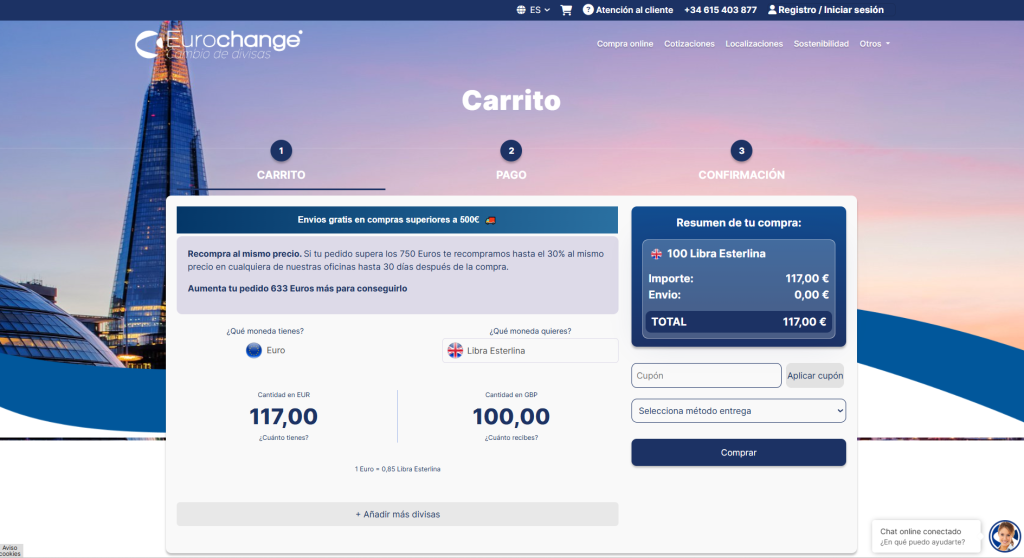
Step 1: Choose Your Currency and Amount (“CART”)
Select the currency and the amount you would like to purchase. The maximum amount for online purchases is €2,000. For larger amounts, please contact our Customer Service team. The minimum order amount is €100.
You can add more currencies to the same order by clicking the “+ Add more currencies” link. You can also apply a discount coupon here if you have one.
In the Delivery Method Selection tab, choose whether you prefer to collect your order from one of our branches or have it delivered to your home.
COUPON: If you have a discount code, enter it in the cart and click “Apply coupon”. Make sure that the following confirmation message appears in green: “Coupon applied successfully”. If you do not have a discount code, leave the field blank.
Once you have checked that all the information is correct, click the “Buy” button to proceed to the next step.
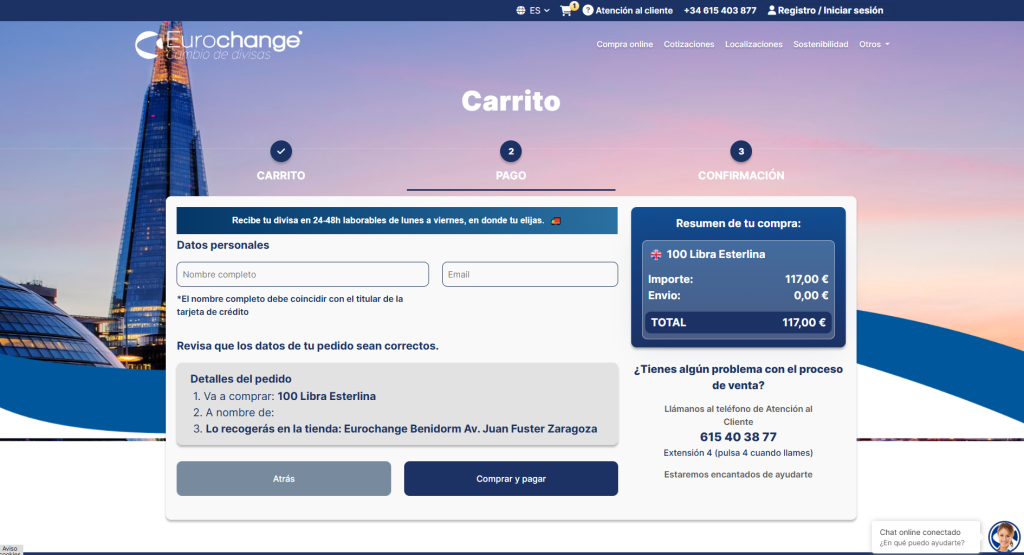
Step 2: Complete Your Payment (“PAYMENT”)
Fill in the fields with your full name and email address for registration.
Review that your order details are correct and click “Buy and pay”.
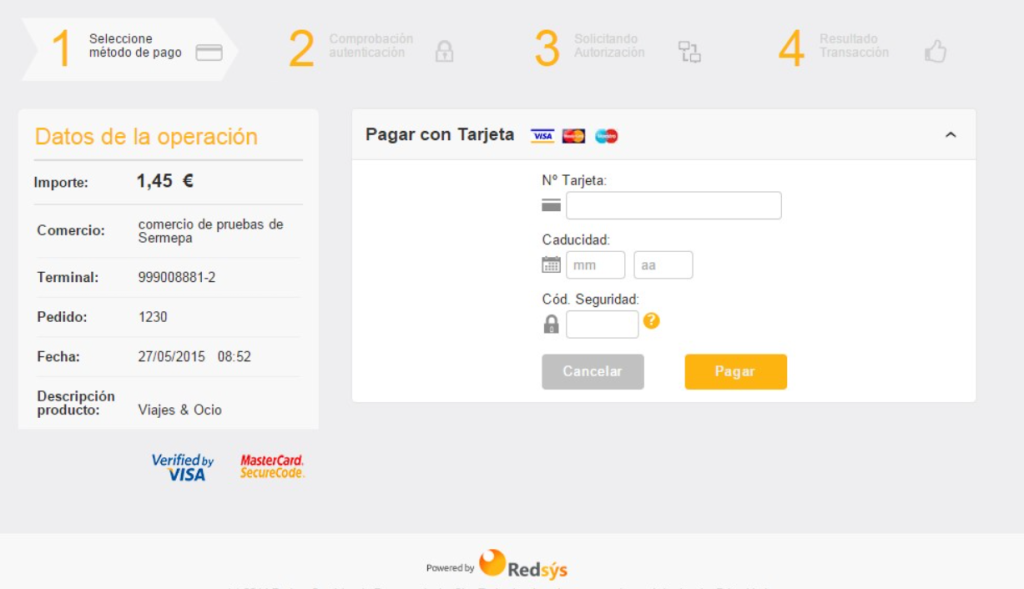
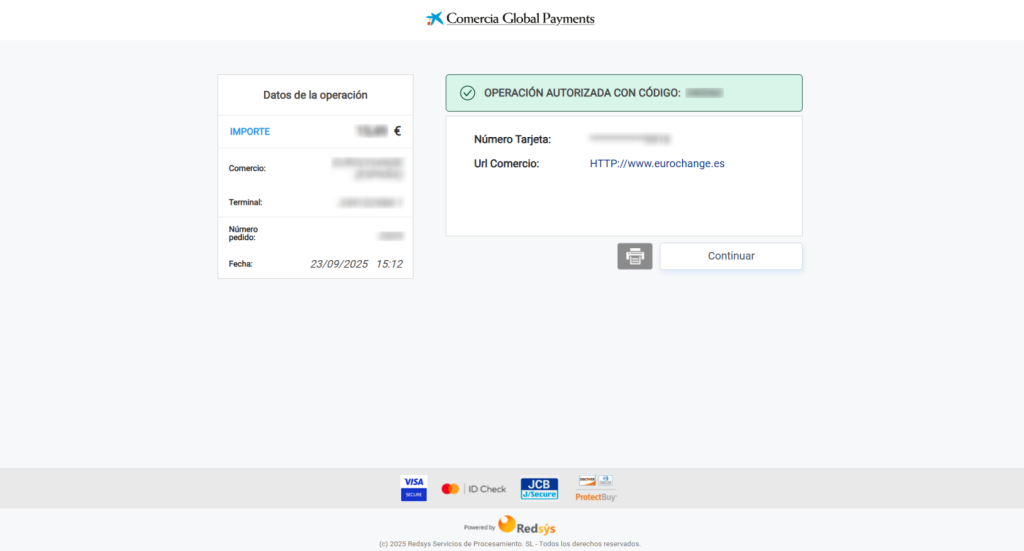
You’ll be redirected to the Redsys platform to enter your card details and complete the payment.
Once paid, click “Continue” to return to the Eurochange website.
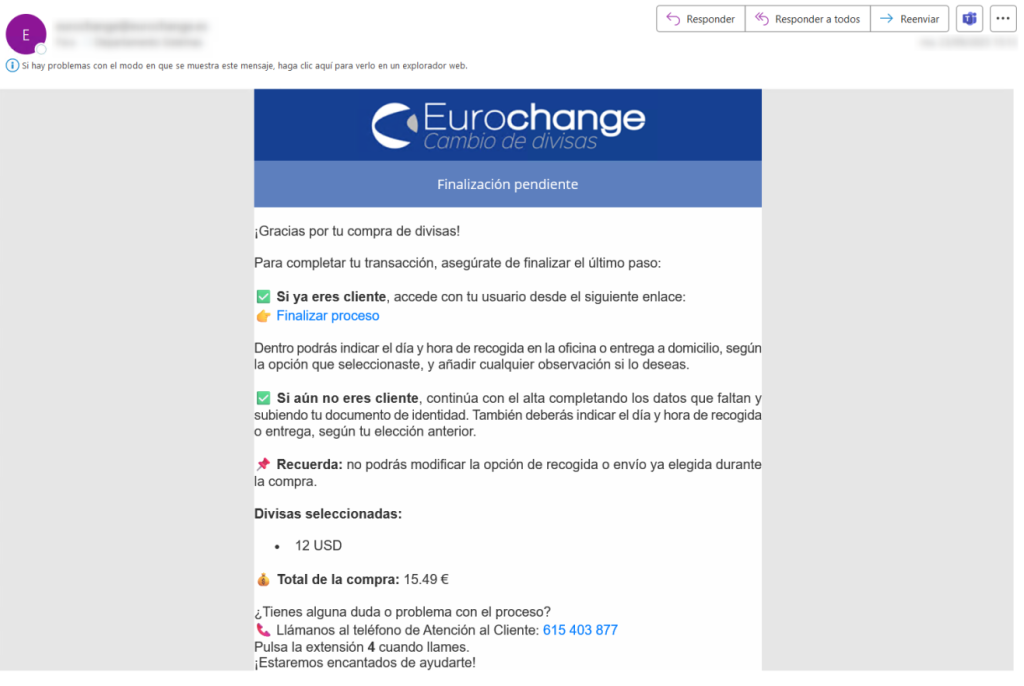
Important: If you are not redirected back to our website or if an error occurs, you will receive an email with a link to finalize your registration. It’s crucial that you complete this process so we can send your order. If you don’t receive the email, check your spam folder. For any questions, you can call us at 615 403 977 and press 4 to contact the online purchases department.
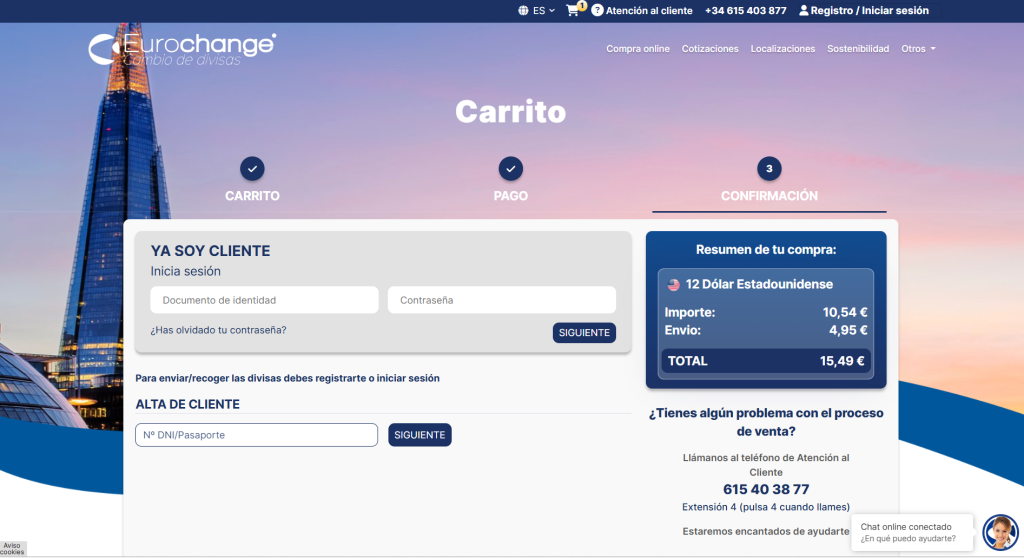
Step 3: Confirm Your Order (“CONFIRMATION”)
If you are already a customer: Log in and click “Next”. You will be taken to the page where you can select the delivery date and time (a minimum of 48 business hours is required). If you selected collection from a branch, you will be able to choose the branch where you would like to collect your order. If you selected home delivery, you will need to enter your delivery details.
If you are not yet a customer:
Enter your Spanish ID (DNI) or passport number and click “NEXT”.
Note: If the system detects that your ID is already registered in one of our physical branches, you will be asked to enter your date of birth in order to retrieve your existing customer details.
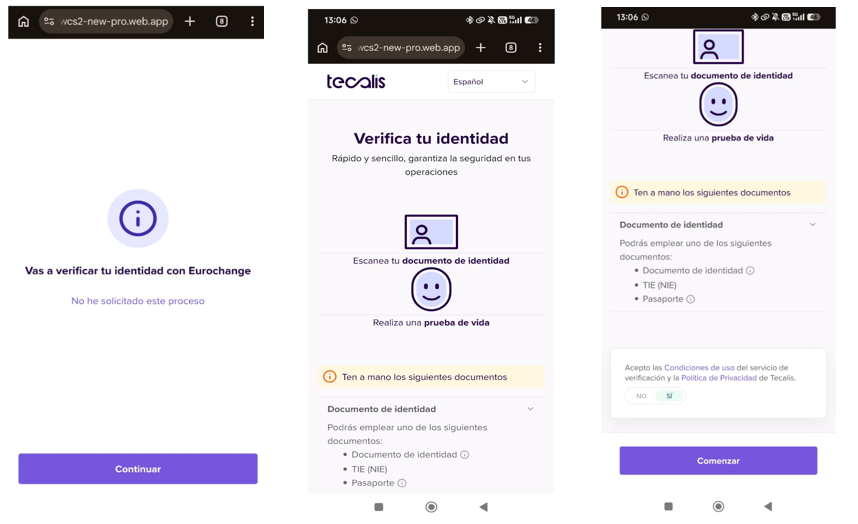
Secure Identity Verification (Tecalis KYC)
- The system will load the identity verification platform. If you are using a computer, we strongly recommend selecting the “Your mobile phone” option and scanning the QR code displayed on the screen. This allows you to continue the process on your phone, using its cameras for better image quality and a smoother experience.
- Welcome: The message “You are going to verify your identity with Eurochange” will appear. Click “Continue”.
- Terms and Conditions: The system will display the steps you need to follow. Scroll down, select “YES” to accept Tecalis’ Privacy Policy, and click “Start”.
- Note: If the system detects that your ID is already registered in one of our physical branches, you will be asked to enter your date of birth in order to retrieve your existing customer details.
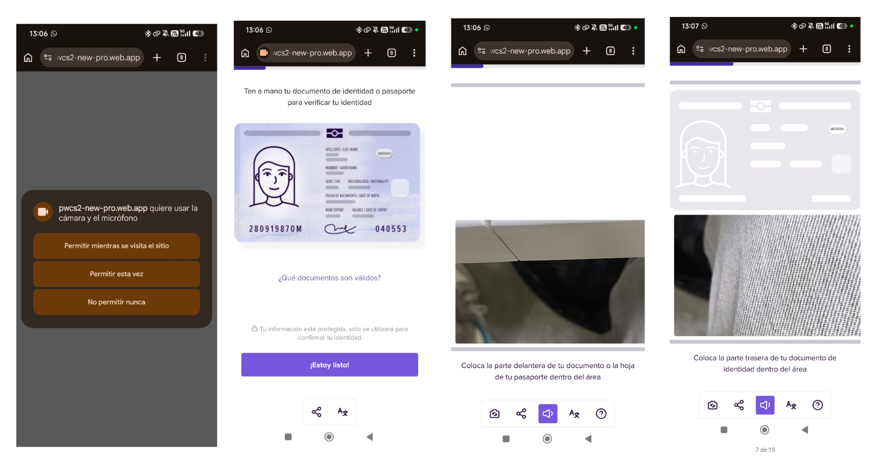
Camera Permissions: The browser will request access to the camera. You must select “Allow while visiting the site”; otherwise, the verification process will not work.
Document Scanning: After clicking “I’m ready!”, place the front of your ID card (DNI/NIE) or passport within the camera frame. Keep the document steady until the frame turns blue, then wait a few seconds for the system to recognise the document. Once successfully detected, the frame will turn green.
If you are using a DNI or NIE, you will then be asked to scan the back of the document.
- If the system does not detect the document automatically, after approximately 60 seconds a camera button will appear, allowing you to take the photo manually. Once the photo has been taken, click “Save” to continue to the next step.
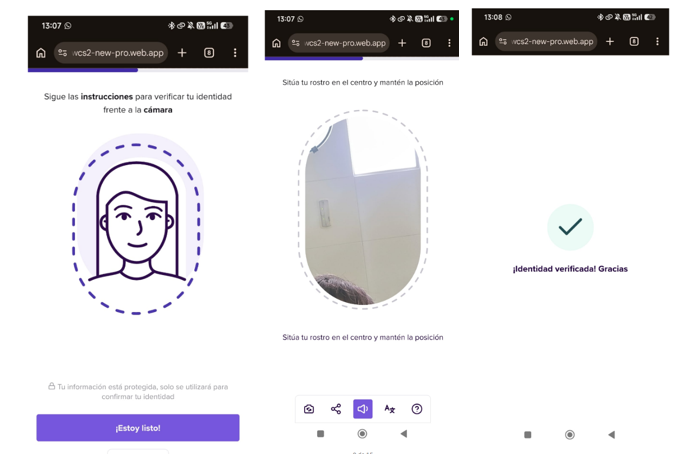
- Liveness Check (Selfie): Position your face inside the oval displayed on the screen. The oval will turn green when your face is correctly positioned. Follow the on-screen instruction: “Position your face in the centre and hold still”. This step confirms that you are a real person.
- Success: A green check mark will appear with the message “Identity verified! Thank you”. You will then be automatically redirected back to the Eurochange website.
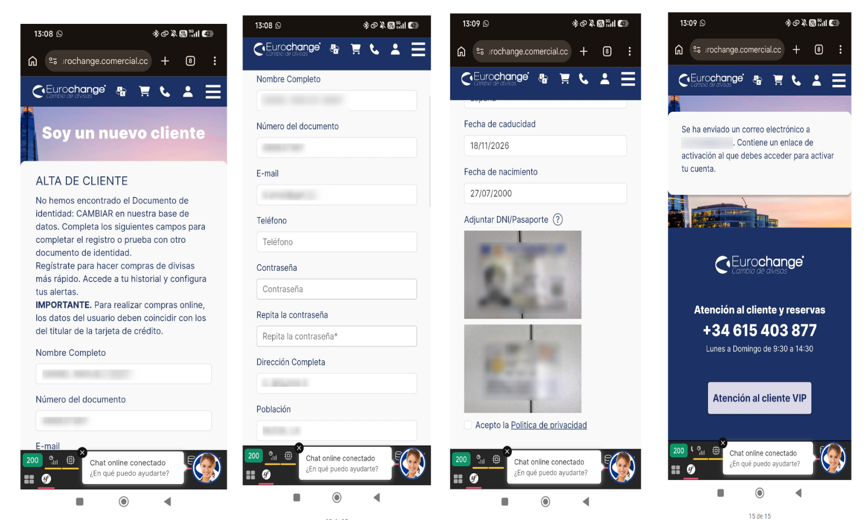
- Automatic Form Completion: After verification, the website form will be automatically completed with the information extracted from the customer’s identity document, including their name, document number, address and relevant dates.
- The customer only needs to enter their email address, phone number, any other required information, and create a password.
- The images of the customer’s identity document will also be displayed. The customer must select “I accept the Privacy Policy” and submit the form.
- Activation Email: The website will confirm that an activation email has been sent. The customer MUST open the email and click the activation link before they can access their account.
Still have questions? If you want to confirm the price, amount, delivery date, or any other details before making your purchase, our Customer Service Center (by phone or online chat) will be happy to help you. Don’t hesitate to ask!
Other Frequently Asked Questions
What if I need specific banknotes?
Sometimes, it is recommended to carry specific banknotes. For example, in some countries in Asia or South America, it’s advised to use dollars that are in perfect condition and from certain years of issue. If you have any special requests about the banknotes you need, contact us and explain your requirement. We’ll do our best to prepare your order according to your needs.
What happens if I’m not home when my order is delivered?
Eurochange shipments are delivered to the address you provide. If you are absent, the courier service will leave a notice or send you an SMS so you can contact them and arrange a new delivery.
Tip #4: Get your order on time!
If you think you won’t be home and need your order without delays, we offer the option to send the package to the courier service’s depot closest to your home. That way, you can pick it up first thing in the morning.
Is it better to exchange cash or pay with a card?
This is a very common question, and there is no universal answer. Traveling to New York, where you can pay with a card even at street stalls, is not the same as going to Vietnam, where internet connection can be difficult to find in some places.
Tip #5: Combine both methods!
At Eurochange, we always recommend our customers carry at least a portion of their budget in cash. Although it may not seem like it, there are still places that don’t accept card payments. Additionally, when you exchange cash, you know beforehand what you’ve paid. On the other hand, if you pay with a card or withdraw money from an ATM, you’ll pay whatever your bank charges for commissions and currency conversion, which can be difficult to track. Carrying a card for emergencies is a great idea, but always confirm with your bank the exchange rates and fees they apply to avoid surprises.
We hope this guide helps you plan your currency exchange simply and securely.

